Argo Workflows is an open-source, container-native workflow engine for orchestrating parallel jobs on Kubernetes. Every step in a workflow runs as a container inside a pod, and the workflow itself is defined as a Kubernetes custom resource written in YAML. That simple idea — "a workflow is just another Kubernetes object" — is what makes Argo Workflows so popular with platform teams, data engineers and machine learning practitioners who already run their infrastructure on Kubernetes.
This guide explains what Argo Workflows is, how it works under the hood, what problems it solves and where it fits compared with other orchestration tools. By the end you will understand the vocabulary used throughout the rest of this site and be ready to install it and run your first workflow.
A Short Definition of Argo Workflows
Argo Workflows is a Kubernetes controller plus a custom resource definition (CRD). You describe a workflow as a Workflow object, apply it to the cluster, and the workflow controller turns that description into pods, tracks their progress, passes data between them and records the result.
The project is part of the wider Argo family, which also includes Argo CD (GitOps continuous delivery), Argo Rollouts (progressive delivery) and Argo Events (event-driven automation). The Argo project is hosted by the Cloud Native Computing Foundation (CNCF) and has graduated status, which signals a mature governance model, a security audit history and broad production adoption.
Key characteristics at a glance:
- Kubernetes-native: workflows are CRDs, managed with
kubectl, RBAC, namespaces and GitOps like any other resource. - Container-first: each step is an ordinary container image, so any language, tool or binary can be used.
- Parallel by design: steps and DAG tasks run concurrently whenever their dependencies allow it.
- Declarative: the entire pipeline, including retries, timeouts and conditions, is expressed in YAML.
- Lightweight to operate: there is no separate scheduler database required for basic operation; state lives in the Kubernetes API.
Why Argo Workflows Exists
Before container-native engines, teams often orchestrated batch jobs with cron on virtual machines, with general-purpose CI servers, or with Python-centric schedulers. Those approaches work, but they introduce friction when the rest of the platform lives on Kubernetes:
- Jobs run on separate worker fleets that must be patched, scaled and secured independently.
- Dependencies are installed onto shared workers, so one team's library upgrade can break another team's job.
- Resource isolation is weak, which makes noisy-neighbour problems common.
- Access control and audit trails live in yet another system.
Argo Workflows removes these problems by reusing what Kubernetes already provides. Isolation comes from containers, scheduling comes from the Kubernetes scheduler, security comes from service accounts and RBAC, and scaling comes from your cluster autoscaler. The engine focuses on the part Kubernetes does not offer natively: ordering, parallelism, data passing and failure handling across many pods.
How Argo Workflows Works: The Architecture
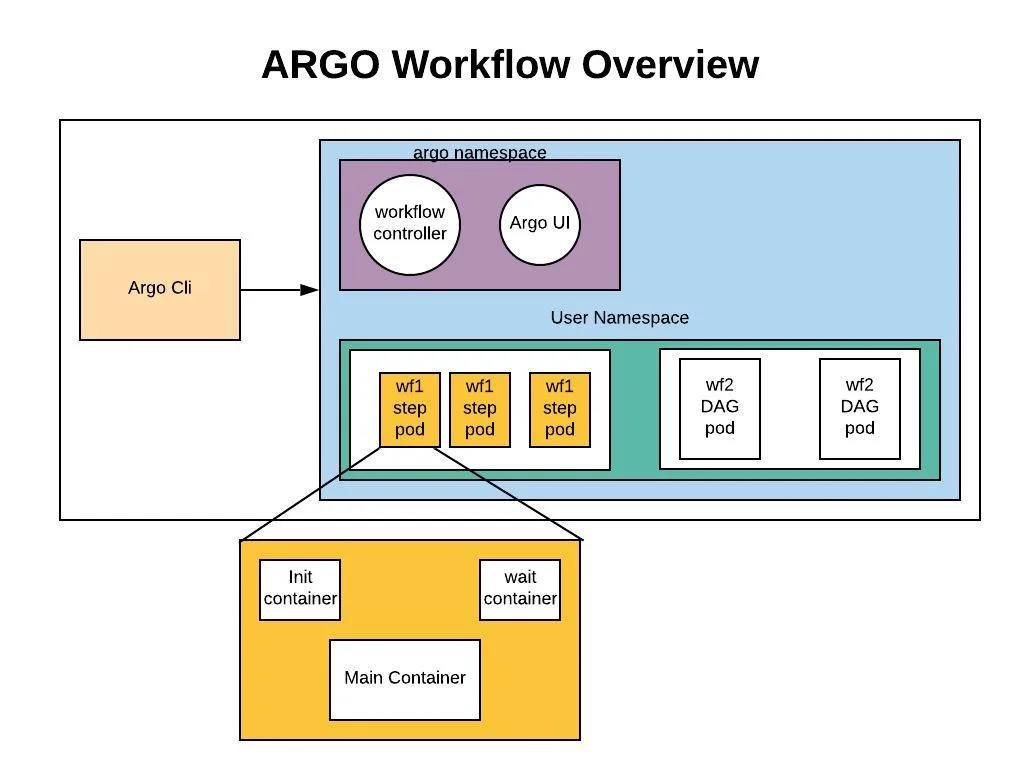
Understanding the architecture makes troubleshooting far easier later. An installation has three main parts.
The Workflow Controller
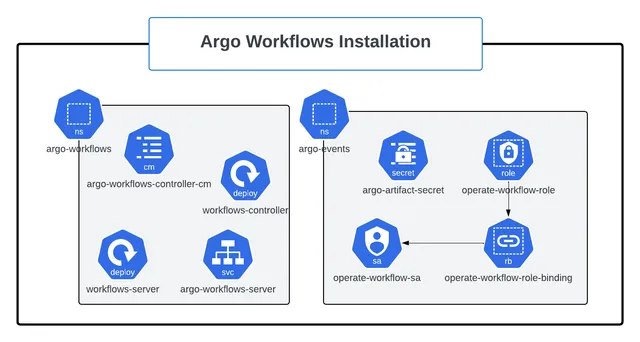
The workflow controller is a Deployment that watches Workflow objects. When a new workflow appears, the controller evaluates which steps are ready, creates pods for them, watches those pods and updates the workflow's status field with node states. It repeats this reconciliation loop until the workflow succeeds, fails or errors. Configuration for the controller lives in the workflow-controller-configmap, where you define defaults such as the artifact repository, executor resource limits, parallelism caps and persistence settings.
The Argo Server
The Argo Server provides the web UI and an API (gRPC and HTTP). It is optional for running workflows — the controller does all the orchestration — but most teams deploy it because the UI shows live DAG graphs, logs, artifacts and archived history. The server listens on port 2746 by default and supports client token, server and SSO authentication modes.
The Executor
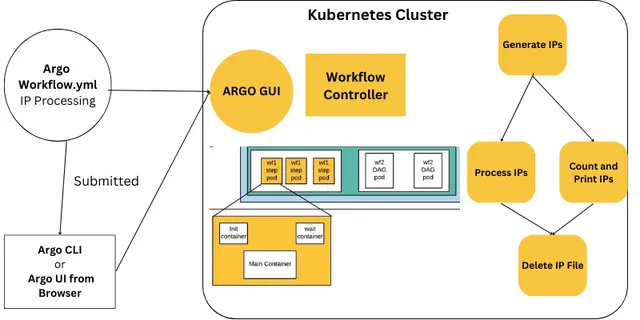
Each workflow pod contains your main container plus small Argo-managed containers. The modern executor is called emissary. An init container prepares inputs such as artifacts, the emissary wrapper runs your command inside the main container, and a wait sidecar collects outputs, uploads artifacts and reports results back to the controller. Older executors (Docker, PNS, Kubelet, Kubernetes API) were removed in version 3.4, so any current installation uses emissary.
Supporting Components
- CRDs:
Workflow,WorkflowTemplate,ClusterWorkflowTemplate,CronWorkflow,WorkflowTaskResultand others. - Artifact repository: S3, MinIO, Google Cloud Storage, Azure Blob, Artifactory, HDFS, OSS or Git for storing files produced by steps.
- Workflow archive (optional): a PostgreSQL or MySQL database for long-term history after workflow objects are deleted from the cluster.
Core Concepts You Need to Know
Workflows
A Workflow is a single execution. It has an entrypoint (the template to start with) and a list of templates. Most workflows use generateName so every submission gets a unique name.
apiVersion: argoproj.io/v1alpha1
kind: Workflow
metadata:
  generateName: hello-argo-
spec:
  entrypoint: main
  templates:
    - name: main
      container:
        image: busybox:1.36
        command: [echo]
        args: ["Hello from Argo Workflows"]
Templates
A template is a reusable unit of work. There are two families:
- Work templates do something:
container,script,resource(create or patch a Kubernetes object),http,suspend,containerSetanddata. - Orchestration templates call other templates:
steps(sequential groups with parallel items) anddag(a dependency graph).
Every template has exactly one type. Mixing container and steps in the same template is a validation error.
Steps and DAGs
Steps are a list of lists. The outer list runs sequentially; items in an inner list run in parallel. DAGs express dependencies explicitly, so independent branches start immediately without manual grouping. Both produce the same pods; they differ only in how you describe ordering. See the DAG guide for a deep comparison.
Parameters and Artifacts
Parameters are small strings passed between templates using expressions such as {{inputs.parameters.name}} or {{steps.build.outputs.parameters.version}}. Artifacts are files or directories stored in the artifact repository and mounted into later steps. A practical rule: use parameters for values under a few kilobytes and artifacts for anything larger.
WorkflowTemplates and CronWorkflows
A WorkflowTemplate stores a workflow definition in the cluster so it can be submitted repeatedly or referenced from other workflows. A ClusterWorkflowTemplate does the same at cluster scope. A CronWorkflow wraps a workflow spec with a schedule, timezone and concurrency policy. The templates guide and the CronWorkflow guide cover both in detail.
Key Features That Make Argo Workflows Powerful
Failure Handling
retryStrategywith limits, backoff and policies such asOnFailureorOnTransientError.activeDeadlineSecondsto stop runaway steps or entire workflows.onExithandlers and lifecycle hooks for notifications and cleanup.continueOnto tolerate failures in non-critical steps.
Control Flow
whenconditions for branching.- Loops with
withItems,withParamandwithSequencefor fan-out. - Recursion, where a template calls itself until a condition is met.
parallelismlimits andsynchronizationwith mutexes or semaphores.
Operations
- Pod garbage collection (
podGC) and time-to-live (ttlStrategy) to keep clusters tidy. - Memoization to skip steps whose results are already cached.
- Prometheus metrics, both built-in and custom per template.
- Workflow archiving to a SQL database for history and auditing.
Common Use Cases
Data Processing and ETL
Fan-out patterns make Argo Workflows a natural fit for batch data jobs. A first step lists input partitions, a second step processes each partition in parallel pods, and a final step merges results. Because each pod requests its own CPU and memory, the cluster autoscaler can add nodes for the burst and remove them afterwards.
Machine Learning Pipelines
Training pipelines often mix data preparation, GPU training, evaluation and model registration. Argo Workflows lets each step request different hardware, pass datasets as artifacts and fail fast when evaluation metrics fall below a threshold. Kubeflow Pipelines historically used Argo Workflows as its execution backend, which shows how well the model suits ML work.
CI and Build Automation
Teams build container images, run test matrices and publish artifacts with Argo Workflows, often triggered by Argo Events from a Git webhook. While dedicated CI products offer richer developer experiences, Argo shines for heavy, parallel builds that benefit from cluster-scale resources.
Infrastructure Automation
Using resource templates, workflows can create Kubernetes Jobs, apply manifests, wait for conditions and roll back. Combined with CronWorkflows this covers database backups, certificate checks, report generation and environment cleanup.
Advantages and Limitations
Advantages
- Runs anywhere Kubernetes runs, from a laptop cluster to managed cloud services.
- Every step is isolated, reproducible and independently resourced.
- Scales to thousands of parallel pods when the cluster has capacity.
- Integrates with GitOps because workflows and templates are plain YAML.
- Strong community, extensive examples and CNCF governance.
Limitations
- Requires Kubernetes knowledge; teams new to pods and RBAC face a learning curve.
- Very large workflows can exceed etcd object size limits unless node status offloading is enabled.
- YAML can become verbose; many teams use Hera (a Python SDK) or templates to reduce repetition.
- Pod start-up overhead makes it a poor choice for thousands of sub-second tasks.
Argo Workflows vs Other Orchestrators
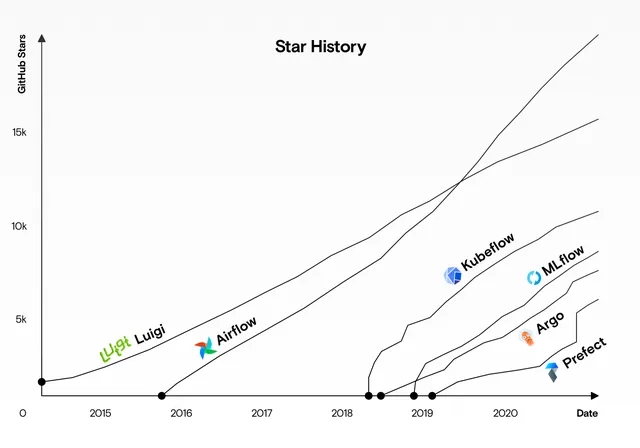
Argo Workflows is often compared with Apache Airflow and Tekton. Airflow is Python-first, with a rich scheduler and a large catalogue of operators for external systems. Tekton is focused on CI/CD building blocks such as tasks, pipelines and triggers. Argo Workflows sits between them: general-purpose like Airflow, Kubernetes-native like Tekton. Read the detailed comparisons in Argo Workflows vs Airflow and Argo Workflows vs Tekton.
How to Get Started in Four Steps
- Prepare a cluster. Any conformant cluster works; kind, k3d or minikube are fine for learning.
- Install Argo Workflows. Apply the release manifest into an
argonamespace or use the Helm chart. The installation guide walks through both. - Install the CLI. The
argoCLI submits, watches, lists and inspects workflows. - Submit a workflow. Generate one with our YAML generator and run:
argo submit -n argo hello.yaml --watch
argo logs -n argo @latest
Troubleshooting Early Problems
New users usually hit the same handful of issues:
- Pods are forbidden: the workflow's service account lacks permission. Create a service account with the minimal executor role and set
serviceAccountName. - Workflow stuck in Pending: the cluster lacks CPU or memory, or a resource quota blocks pod creation. Run
kubectl describe podon the pending pod. - Entrypoint not found: the
entrypointvalue does not match any template name. Our YAML validator catches this instantly. - Artifact errors: no artifact repository is configured. Configure one in the controller ConfigMap or remove artifact outputs.
The full troubleshooting guide covers more than twenty errors with fixes.
Quick Glossary
Keep these terms handy while reading the rest of the site:
- Node: any step, task or template invocation shown in the workflow graph; pods are created only for work templates.
- Phase: the status of a workflow or node, such as
Pending,Running,Succeeded,FailedorError. - Entrypoint: the template that runs first when the workflow starts.
- Exit handler: a template referenced by
onExitthat always runs at the end, whatever the outcome. - Artifact repository: the object store where file outputs are saved between steps.
- Archive: the optional SQL database that keeps workflow history after objects are deleted.
Frequently Asked Questions
Is Argo Workflows free?
Yes. It is open source under the Apache 2.0 licence. Commercial support and hosted offerings exist from several vendors, but the engine itself is free.
Do I need Argo CD to use Argo Workflows?
No. The Argo projects are independent. Many teams use Argo CD to deploy their WorkflowTemplates through GitOps, but it is not required.
Can Argo Workflows run outside Kubernetes?
No. It depends on the Kubernetes API, scheduler and pods. For local development use a lightweight cluster such as kind or k3d.
Which languages can I use in steps?
Any language that can be packaged in a container image. Script templates also let you embed Python, Bash or JavaScript source directly in the YAML.
How is Argo Workflows different from a Kubernetes Job?
A Job runs one pod template to completion. Argo Workflows coordinates many pods with dependencies, data passing, retries, conditions and a UI, which would otherwise require custom glue code.
Conclusion
Argo Workflows turns Kubernetes into a general-purpose workflow platform. By modelling pipelines as custom resources and steps as containers, it gives teams isolation, parallelism and GitOps-friendly definitions without running a separate orchestration cluster. Continue with the hands-on tutorial to write your first multi-step workflow, or explore the interactive tools to generate and validate YAML in your browser.

Written and reviewed according to our editorial policy. Spotted an error? Tell us and we will fix it. This site is independent and not affiliated with the Argo Project.
Related guides
 Tutorials
How Do You Build Your First Argo Workflows Pipeline?
A hands-on Argo Workflows tutorial. Write, submit and debug workflows with steps, parameters, outputs, loops, conditions, retries and exit handlers using working YAML.
 Installation
How Do You Install Argo Workflows on Kubernetes?
Install Argo Workflows on Kubernetes with kubectl manifests or Helm, install the argo CLI, access the UI, configure an artifact repository and harden the setup for production.
 Comparisons
Argo Workflows vs Airflow: Which Should You Choose?
An in-depth comparison of Argo Workflows and Apache Airflow covering architecture, authoring, scheduling, scalability, Kubernetes integration, operations, cost and the best use cases for each.