
Argo Workflows Installation
Choose the right installation method, run the commands, and set up the pieces every installation needs before teams start using it.
Pick an installation method
| Method | Best for | Trade-off |
|---|---|---|
Release manifest (install.yaml) | Quick labs and simple clusters | Overrides need patches or kustomize |
| Namespaced manifest | Shared clusters without cluster-admin for teams | One controller per namespace |
| Helm chart | Repeatable installs, many environments | Chart values change between versions |
| Argo CD / GitOps | Platform teams managing many clusters | Requires an existing GitOps setup |
Quick commands
export ARGO_WORKFLOWS_VERSION="v4.1.2"   # check the releases page for the latest
kubectl create namespace argo
kubectl apply -n argo -f "https://github.com/argoproj/argo-workflows/releases/download/${ARGO_WORKFLOWS_VERSION}/install.yaml"
kubectl -n argo rollout status deploy/workflow-controller
kubectl -n argo port-forward svc/argo-server 2746:2746
If the CRD apply reports that annotations are too long, add --server-side. Then follow the full installation guide for the CLI, UI authentication and artifacts.
After installing
- Create a workflow service account and executor role — generate it with the Kubernetes YAML generator.
- Configure a default artifact repository if any workflow will pass files.
- Set
workflowDefaultsfor TTL, podGC and deadlines in the controller ConfigMap. - Decide on UI authentication: client tokens or SSO for anything beyond a laptop.
- Submit a smoke-test workflow in each namespace the controller watches.
Upgrade checklist
Read the upgrading notes for every version you cross, back up templates and the controller ConfigMap, upgrade a staging cluster first and run your most important templates as smoke tests. Version 4.0 removed the CronWorkflow schedule field and singular mutex and semaphore fields, so lint manifests with the validator before upgrading.
Guides
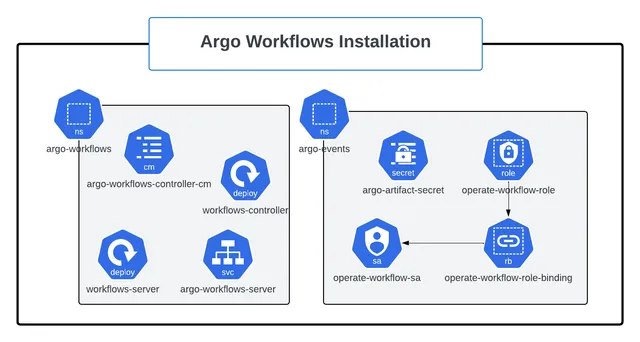 Installation
How Do You Install Argo Workflows on Kubernetes?
Install Argo Workflows on Kubernetes with kubectl manifests or Helm, install the argo CLI, access the UI, configure an artifact repository and harden the setup for production.
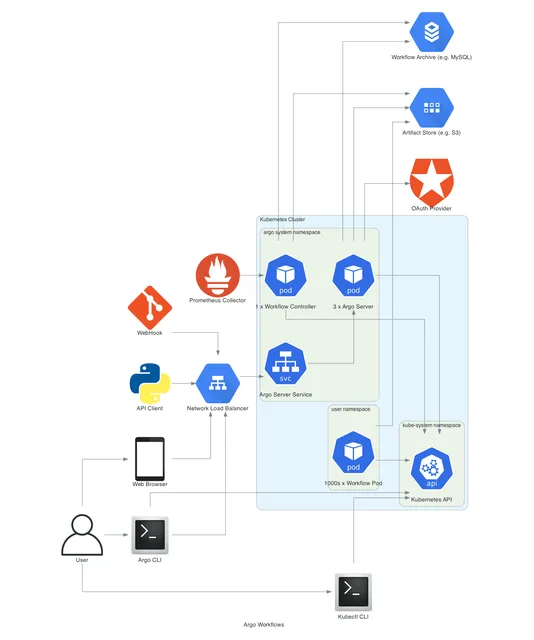 Kubernetes Integration
How Does Argo Workflows Integrate With Kubernetes?
How Argo Workflows integrates with Kubernetes — service accounts, executor RBAC, namespaces, resource requests, scheduling, volumes, secrets, network policies and multi-tenant security.