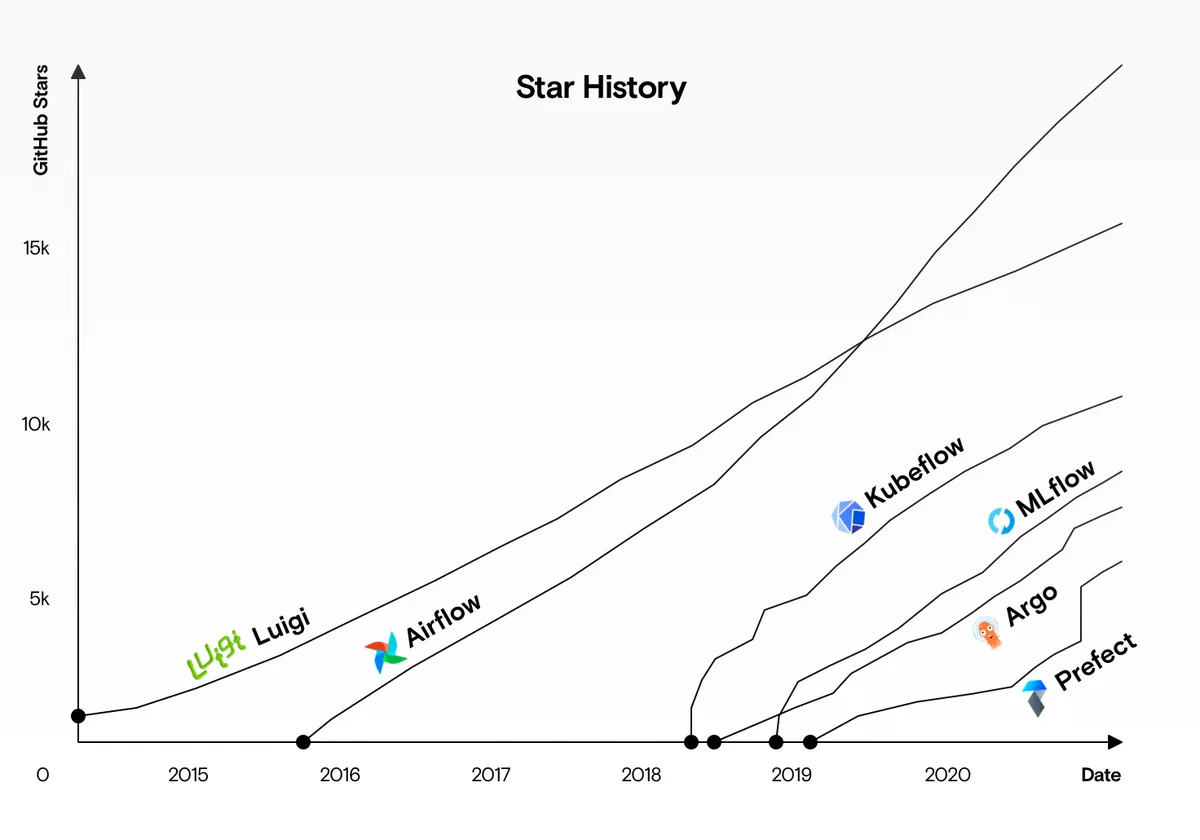
Argo Workflows and Apache Airflow are two of the most widely used open-source orchestrators, and they are frequently evaluated against each other for data, machine learning and platform automation. Both model pipelines as directed acyclic graphs, both schedule recurring work and both have large communities. Beyond those similarities, however, they were designed from very different starting points. This comparison explains those differences so you can choose based on your team, your infrastructure and your workloads rather than on popularity.
The Short Answer
- Choose Argo Workflows when your platform runs on Kubernetes, your steps are containerised, you need massive parallelism or heterogeneous hardware per step, and your team is comfortable with YAML and Kubernetes concepts.
- Choose Airflow when your team writes Python, your pipelines mostly call external systems such as warehouses and SaaS APIs, you value a huge catalogue of ready-made integrations, and time-based data scheduling semantics are central to your work.
- Many organisations run both: Airflow for warehouse-centric scheduling, Argo Workflows for compute-heavy container jobs, sometimes with Airflow triggering Argo.
Origins and Design Philosophy
Argo Workflows
Argo Workflows was created at Applatix and later developed by Intuit and the community, and is part of the CNCF-graduated Argo project. Its design premise is that Kubernetes should be the execution engine. A workflow is a custom resource, each step is a pod, and the controller is a standard Kubernetes reconciler. There is no separate worker pool: the cluster itself is the worker pool.
Apache Airflow
Airflow was created at Airbnb in 2014 and became a top-level Apache Software Foundation project. Its premise is "pipelines as Python code". A scheduler parses Python files that define DAGs, decides which tasks are due, and hands them to an executor. Airflow 3, released in 2025, modernised the platform with a new UI, a task execution interface that decouples workers from the metadata database, DAG versioning and stronger support for event-driven and asset-based scheduling.
Architecture Compared
| Component | Argo Workflows | Airflow |
|---|---|---|
| Definition format | Kubernetes YAML (or Python via Hera) | Python code |
| Control plane | Workflow controller (Kubernetes operator) | Scheduler, API server, DAG processor |
| State store | Kubernetes API (etcd), optional SQL archive | Metadata database (PostgreSQL or MySQL) required |
| Execution | One pod per step | Executor: Local, Celery, Kubernetes, Edge and others |
| UI | Argo Server | Airflow web UI |
| Runtime dependency | Kubernetes | Any infrastructure; Kubernetes optional |
The practical consequence is operational footprint. Argo Workflows adds a controller and a server to an existing cluster. Airflow requires a metadata database, a scheduler, an API server and an executor environment, plus a way to distribute DAG files to all components. Managed services such as Amazon MWAA, Google Cloud Composer and Astronomer remove much of that burden for Airflow, while managed Argo offerings exist from several vendors.
Authoring Experience
Writing an Argo Workflow
apiVersion: argoproj.io/v1alpha1
kind: Workflow
metadata:
  generateName: etl-
spec:
  entrypoint: etl
  templates:
    - name: etl
      dag:
        tasks:
          - {name: extract, template: run, arguments: {parameters: [{name: cmd, value: extract}]}}
          - {name: transform, depends: extract, template: run, arguments: {parameters: [{name: cmd, value: transform}]}}
          - {name: load, depends: transform, template: run, arguments: {parameters: [{name: cmd, value: load}]}}
    - name: run
      inputs: {parameters: [{name: cmd}]}
      container:
        image: ghcr.io/example/etl:1.0.0
        args: ["{{inputs.parameters.cmd}}"]
Writing the Equivalent Airflow DAG
from airflow.sdk import dag, task
import pendulum

@dag(schedule="@daily", start_date=pendulum.datetime(2026, 1, 1), catchup=False)
def etl():
    @task
    def extract():
        return "raw"

    @task
    def transform(data):
        return data.upper()

    @task
    def load(data):
        print(data)

    load(transform(extract()))

etl()
Airflow's Python authoring feels natural to data engineers and allows loops, conditionals and helper functions while the DAG is being defined. Argo's YAML is declarative and language-neutral: the steps can be written in any language because they are containers. Teams that prefer Python for Argo often use Hera, which generates Argo manifests from Python code and narrows the authoring gap considerably.
Execution Model and Isolation
In Argo Workflows every step is isolated in its own container with its own image, dependencies, resource requests and service account. Two steps can use completely different language runtimes and library versions without conflict.
In Airflow, tasks run inside worker processes that share an environment unless you use the KubernetesExecutor, the KubernetesPodOperator or containerised task approaches. Shared environments are efficient for lightweight tasks but can lead to dependency conflicts as the number of teams grows. Airflow has steadily improved isolation, but container-per-task is the default in Argo and an opt-in in Airflow.
Scheduling Semantics
Airflow's scheduler is its signature feature. Concepts such as data intervals, logical dates, catchup and backfill make it straightforward to express "process yesterday's partition" and to rerun historical periods. Asset-based scheduling lets DAGs trigger when upstream data is updated.
Argo Workflows schedules through CronWorkflows, which support cron expressions, timezones, concurrency policies, starting deadlines and conditional runs. Event-driven triggering is handled by the companion Argo Events project. Argo does not have Airflow's built-in notion of data intervals; you pass dates as parameters, typically derived from {{workflow.scheduledTime}}. For warehouse-style incremental processing, Airflow's semantics are richer out of the box.
Scalability and Performance
Argo Workflows scales with the cluster. A single workflow can fan out to thousands of pods, and each pod can request GPUs, large memory or specific node types. The limiting factors are cluster capacity, the Kubernetes API server and the size of workflow objects for extremely large graphs.
Airflow scales by adding workers and tuning the scheduler. It handles very large numbers of DAGs and frequent small tasks well, because tasks in a running worker start quickly. Pod-per-task models — in either tool — pay a start-up cost of several seconds per task, which matters for thousands of tiny tasks but not for minutes-long compute jobs.
Integrations
Airflow's provider ecosystem is one of its biggest advantages: hundreds of operators, hooks and sensors for databases, warehouses, cloud services and SaaS tools. Calling Snowflake, BigQuery or a REST API is often a few lines of configuration.
Argo Workflows integrates through containers. Any CLI or SDK packaged into an image becomes a step, and HTTP templates call APIs directly. There are fewer pre-built connectors, but there is also no integration you cannot build, and the Argo ecosystem — Argo CD, Argo Events, Argo Rollouts — integrates tightly with Kubernetes-native delivery.
Operations and Cost
| Concern | Argo Workflows | Airflow |
|---|---|---|
| Components to run | Controller, server | Scheduler, API server, DAG processor, workers, database |
| Upgrades | Controller and CRDs | Application, database migrations, providers |
| Idle cost | Very low; pods exist only while running | Scheduler and workers usually always on |
| Access control | Kubernetes RBAC and SSO | Airflow roles and auth managers |
| Observability | Prometheus metrics, Kubernetes logs | StatsD/OpenTelemetry metrics, task logs |
Argo's model means you pay for compute only while steps run, and autoscaling clusters shrink when workflows finish. Airflow's always-on components cost more at idle but give faster task starts.
Use Case Fit
Where Argo Workflows Excels
- Machine learning training, hyperparameter sweeps and batch inference with GPUs.
- Large parallel data processing, simulation and genomics.
- Infrastructure automation that creates and manages Kubernetes resources.
- CI-style jobs with heavy, parallel builds.
- Organisations standardising on Kubernetes and GitOps.
Where Airflow Excels
- Warehouse-centric ELT orchestration with many SQL and SaaS integrations.
- Teams of Python data engineers who want code-first pipelines.
- Complex time-based scheduling with backfills and data intervals.
- Environments without Kubernetes, or where Kubernetes expertise is scarce.
Team Skills and Learning Curve
The most reliable predictor of success with either tool is how well it matches the skills your team already has.
Airflow asks engineers to understand Python, the scheduler's notion of dates and intervals, executors and operators. Data engineers usually find this comfortable within days. The harder lessons come later: keeping DAG files fast to parse, avoiding heavy logic at import time, and managing dependencies across many teams' DAGs.
Argo Workflows asks engineers to understand Kubernetes: pods, resource requests, service accounts, RBAC, volumes and container images. Platform and DevOps engineers usually find this natural, while analysts and data scientists may need help at first. Templates and the UI submit form reduce the burden considerably, because end users can run approved pipelines without writing YAML at all.
A Decision Checklist
Answer these questions honestly before choosing:
- Is Kubernetes already your standard runtime, operated by a capable platform team?
- Do most steps need custom containers, different libraries or special hardware?
- Do pipelines fan out to hundreds or thousands of parallel units of work?
- Is the majority of work calling external SQL engines and SaaS APIs rather than computing locally?
- Does your team prefer writing Python over declarative configuration?
- Do you need backfills over historical date ranges as a routine operation?
Mostly "yes" to the first three points towards Argo Workflows; mostly "yes" to the last three points towards Airflow. A mix is a strong sign that using both, each for its strengths, is the pragmatic answer.
Migration Considerations
Moving from Airflow to Argo means rewriting DAGs as YAML or Hera code, containerising task logic, replacing provider operators with container steps or HTTP templates, and recreating scheduling semantics with CronWorkflows and parameters. Moving from Argo to Airflow means rewriting manifests in Python and deciding how to preserve per-step container isolation, usually with the KubernetesPodOperator. In both directions, start with a few representative pipelines, run them in parallel with the old system, and compare outputs before cutting over.
Calling Argo Workflows From Airflow
Running both tools together is common enough that it deserves a concrete pattern. Airflow remains the scheduler that understands business calendars and data intervals, while Argo executes the heavy compute. An Airflow task submits a workflow from a stored WorkflowTemplate — through the Argo Server's REST API, the argo CLI in a container, or a Kubernetes API call that creates a Workflow object with a workflowTemplateRef — and passes the logical date as a parameter. A sensor or deferrable task then polls the workflow's phase until it reaches Succeeded or Failed, and marks the Airflow task accordingly.
This split keeps each system doing what it is best at. Airflow's UI shows the business-level schedule and history, while Argo's UI shows detailed graphs, logs and artifacts for each compute run. Label every Argo workflow with the Airflow DAG ID and run ID so engineers can jump between the two when investigating a failure.
Troubleshooting a Mixed Environment
If you run both tools, a few practices prevent confusion:
- Give one system ownership of each pipeline to avoid double scheduling.
- When Airflow triggers Argo, pass a correlation ID as a workflow parameter and label so runs can be traced end to end.
- Monitor both systems in one dashboard so failures are not missed in either UI.
- Standardise secrets management so both tools read credentials from the same source.
Frequently Asked Questions
Is Argo Workflows faster than Airflow?
For large parallel compute jobs, Argo often finishes sooner because it fans out across the whole cluster. For many tiny tasks, Airflow's long-running workers start tasks faster.
Can Airflow run on Kubernetes?
Yes. The official Helm chart, the KubernetesExecutor and the KubernetesPodOperator are widely used. Kubernetes is optional for Airflow but mandatory for Argo.
Can I write Argo Workflows in Python?
Yes, with the Hera SDK, which generates Argo manifests from Python.
Which has a better UI?
Both are capable. Airflow's UI is centred on DAG runs over time; Argo's UI is centred on individual workflow graphs, logs and artifacts. Preference depends on how you debug.
Should I replace Airflow with Argo?
Only if your workloads and team match Argo's strengths. Many organisations get the best results by using each tool for what it does best.
Key Takeaways
- Argo Workflows is Kubernetes-native and container-first; Airflow is Python-first with rich integrations.
- Isolation is the default in Argo and opt-in in Airflow.
- Airflow's data-interval scheduling is richer; Argo's parallel compute model scales with the cluster.
- Using both together is a valid and common architecture.
- Prototype a real pipeline in both tools before committing; team skills matter more than feature lists.
Conclusion
Argo Workflows is a Kubernetes-native, container-first engine built for parallel compute and platform automation. Airflow is a Python-first scheduler with unmatched integrations and data-interval semantics. Evaluate them against your infrastructure, team skills and workload shape, prototype a real pipeline in each, and remember that combining them is a legitimate architecture. For another perspective, read Argo Workflows vs Tekton. The right choice is the one your team can operate confidently for years.

Written and reviewed according to our editorial policy. Spotted an error? Tell us and we will fix it. This site is independent and not affiliated with the Argo Project.
Related guides
 Comparisons
Argo Workflows vs Tekton: Which Fits Your CI/CD?
Compare Argo Workflows and Tekton Pipelines — resource models, execution, CI/CD features, triggers, supply-chain security, reusability, UI, operations and the best use cases for each.
 Introduction
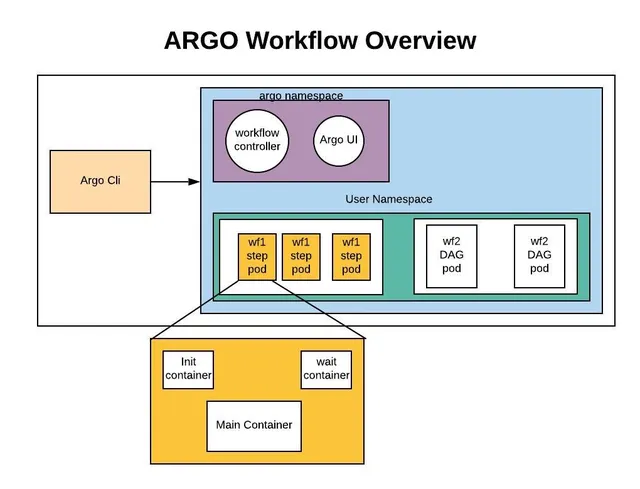
What Is Argo Workflows and How Does It Work?
Learn what Argo Workflows is, how its Kubernetes-native architecture works, the core concepts behind templates, steps and DAGs, and when it is the right engine for your pipelines.
 CronWorkflows
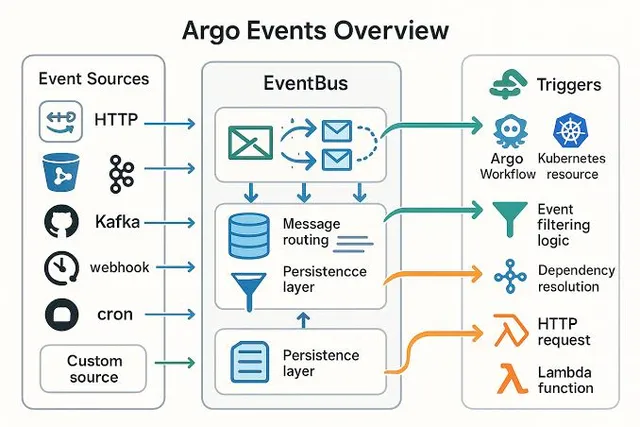
How Do You Schedule Jobs With Argo CronWorkflows?
Schedule Argo Workflows with CronWorkflows. Learn cron syntax, multiple schedules, timezones, concurrency policies, starting deadlines, history limits, suspend, stop strategies and backfills.