
Kubernetes Integration
Service accounts, RBAC, scheduling, storage and security — the Kubernetes foundations that make Argo Workflows reliable.
How Argo Workflows maps onto Kubernetes
Argo Workflows does not hide Kubernetes; it uses it directly. Workflows are custom resources, steps are pods, permissions are RBAC rules and configuration lives in ConfigMaps. Understanding which Kubernetes object is involved in a problem is usually enough to find the fix.
RBAC quick reference
| Who | Needs | Typical grant |
|---|---|---|
| Workflow pods (executor) | Report outputs | create, patch on workflowtaskresults |
| Resource templates | Create objects such as Jobs | Verbs on that resource, on a separate service account |
| Developers | Submit and inspect workflows | CRUD on workflows, read on templates, pods/log |
| Platform admins | Manage shared templates | CRUD on clusterworkflowtemplates |
Multi-tenant layout
Run the controller and server in an argo namespace owned by the platform team, and give every team its own namespace with a dedicated workflow service account, a ResourceQuota, a LimitRange and, if needed, its own artifact repository. Pair this with SSO in the Argo Server so each user only sees the namespaces they belong to.
Production checklist
- Requests and memory limits on every container — including executor containers via the controller ConfigMap.
- Workload identity (IRSA, Workload Identity, Entra Workload ID) instead of static keys.
- Restricted Pod Security Admission on workflow namespaces.
- Network policies that still allow egress to the API server and artifact store.
- Cost labels on every pod through
podMetadata.
Read the complete Kubernetes integration guide, generate RBAC and quotas with the Kubernetes YAML generator, and score your manifests with the configuration checker.
Guides
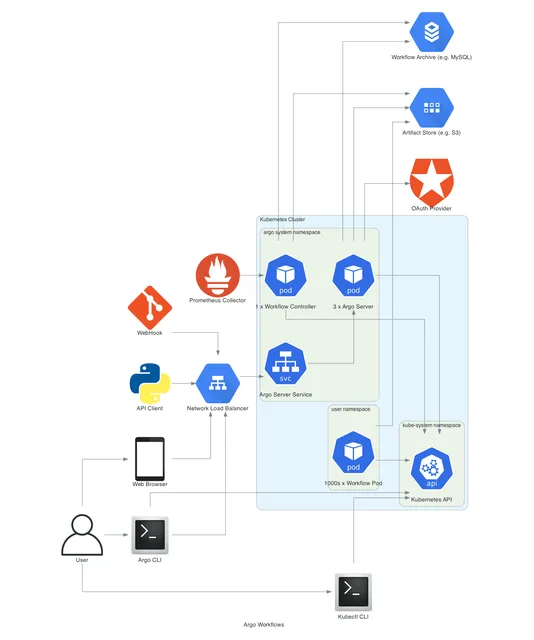 Kubernetes Integration
How Does Argo Workflows Integrate With Kubernetes?
How Argo Workflows integrates with Kubernetes — service accounts, executor RBAC, namespaces, resource requests, scheduling, volumes, secrets, network policies and multi-tenant security.
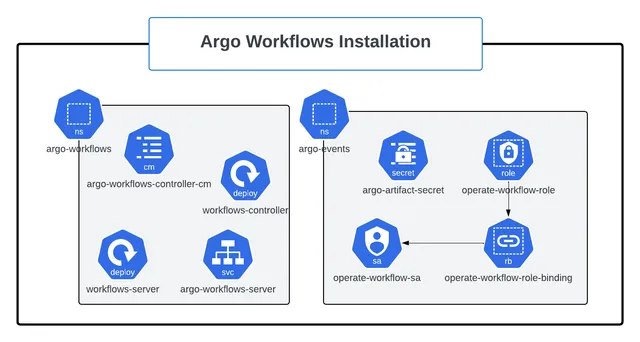 Installation
How Do You Install Argo Workflows on Kubernetes?
Install Argo Workflows on Kubernetes with kubectl manifests or Helm, install the argo CLI, access the UI, configure an artifact repository and harden the setup for production.
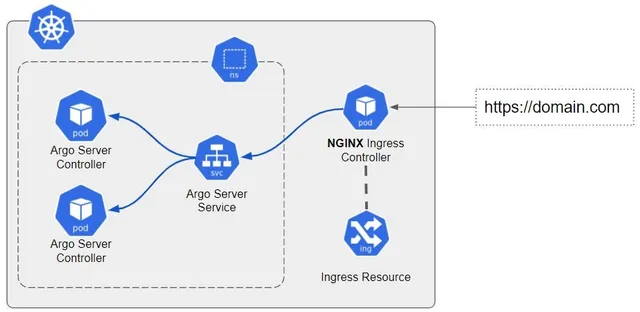 Troubleshooting & Errors
How Do You Fix Common Argo Workflows Errors?
Diagnose and fix common Argo Workflows errors — RBAC and service accounts, pending pods, OOMKilled, image pulls, artifacts, parameter resolution, DAG cycles, UI login, CronWorkflows and controller issues.