Argo Workflows and Tekton are both open-source, Kubernetes-native engines that run each unit of work in containers and are defined through custom resources. On paper they look interchangeable. In practice they were built for different jobs: Argo Workflows is a general-purpose workflow engine, while Tekton is a framework of building blocks for CI/CD systems. Understanding that difference makes the choice much easier.
The Short Answer
- Choose Argo Workflows for general-purpose orchestration: data processing, machine learning, batch jobs, infrastructure automation and complex DAGs with rich control flow.
- Choose Tekton when you are building a CI/CD platform and want standardised, reusable task definitions, event triggers designed for source control and strong software supply-chain security with Tekton Chains.
- Both can run CI pipelines and both can run batch jobs; the question is which one makes your primary use case simpler.
Project Background
Argo Workflows is part of the Argo project, which graduated within the Cloud Native Computing Foundation. It was designed from the start to orchestrate arbitrary parallel jobs on Kubernetes.
Tekton began inside Google's Knative project as "Knative Build" and was spun out as an independent project under the Continuous Delivery Foundation. Its goal is to provide standard Kubernetes resources for building, testing and deploying software, which vendors and platform teams assemble into full CI/CD products. Several commercial pipeline products, such as OpenShift Pipelines, are built on Tekton.
Resource Models Compared
| Concept | Argo Workflows | Tekton |
|---|---|---|
| Unit of work | Template (container, script, resource, http…) | Step inside a Task |
| Grouping | Steps or DAG template | Task (steps) and Pipeline (tasks) |
| Execution record | Workflow | TaskRun and PipelineRun |
| Reusable definition | WorkflowTemplate, ClusterWorkflowTemplate | Task, Pipeline, resolvers (Git, bundles, hub) |
| Scheduling | CronWorkflow | External (CronJob or Triggers) |
| Event triggering | Argo Events | Tekton Triggers |
| Data passing | Parameters, artifacts in object storage | Params, results, workspaces (volumes) |
How Pods Are Used
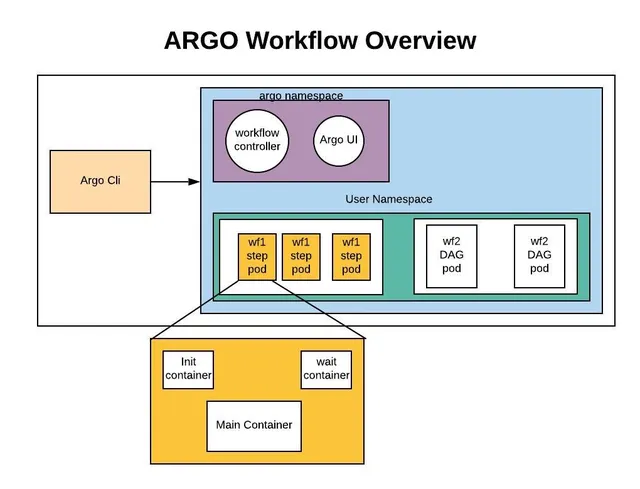
The most important architectural difference is how work maps to pods. In Argo Workflows, each container or script template becomes its own pod. In Tekton, all steps of a Task run as containers within a single pod, sequentially, sharing a workspace. A Pipeline's Tasks then become separate pods.
Tekton's model is efficient for CI: checking out code, building and testing in one pod share the same file system without copying data. Argo's model is better for heterogeneous, parallel work: each step can land on a different node with different hardware. Argo's containerSet template offers a Tekton-like multi-container pod when you need it.
Defining a Pipeline
Argo Workflows
apiVersion: argoproj.io/v1alpha1
kind: Workflow
metadata:
  generateName: ci-
spec:
  entrypoint: ci
  volumeClaimTemplates:
    - metadata: {name: src}
      spec: {accessModes: [ReadWriteOnce], resources: {requests: {storage: 1Gi}}}
  templates:
    - name: ci
      dag:
        tasks:
          - {name: clone, template: git-clone}
          - {name: test, depends: clone, template: go-test}
    - name: git-clone
      container:
        image: alpine/git:2.45.2
        args: [clone, "https://github.com/example/app.git", /src/app]
        volumeMounts: [{name: src, mountPath: /src}]
    - name: go-test
      container:
        image: golang:1.23
        workingDir: /src/app
        command: [go, test, ./...]
        volumeMounts: [{name: src, mountPath: /src}]
Tekton
apiVersion: tekton.dev/v1
kind: Pipeline
metadata:
  name: ci
spec:
  workspaces:
    - name: source
  tasks:
    - name: clone
      taskRef:
        resolver: hub
        params:
          - {name: name, value: git-clone}
          - {name: version, value: "0.9"}
      workspaces: [{name: output, workspace: source}]
      params: [{name: url, value: "https://github.com/example/app.git"}]
    - name: test
      runAfter: [clone]
      taskRef: {name: golang-test}
      workspaces: [{name: source, workspace: source}]
A PipelineRun then binds the workspace to a volume and starts execution. Tekton separates definitions (Task, Pipeline) from executions (TaskRun, PipelineRun) explicitly; Argo combines them in a Workflow, with WorkflowTemplates for reuse. Exact catalog task names and versions vary, so check the hub or Artifact Hub for current ones.
Control Flow Features
Argo Workflows offers a broad set of control-flow primitives: depends expressions with result selectors, when conditions, loops over static or dynamic lists, recursion, retries with backoff and expressions, exit handlers, lifecycle hooks, suspend gates, mutexes and semaphores, and memoization. These make Argo particularly strong for data and ML pipelines with complex logic.
Tekton supports runAfter ordering, when expressions, finally tasks (similar to exit handlers), retries, timeouts and matrix fan-out for parallel combinations. Its control flow is deliberately simpler, reflecting its CI/CD focus where pipelines tend to be more linear.
CI/CD-Specific Capabilities
Tekton Strengths
- Tekton Triggers turns webhooks from Git providers into PipelineRuns with interceptors for filtering and validation.
- Tekton Chains observes TaskRuns, signs results and generates SLSA provenance, which is valuable for supply-chain security programmes.
- Resolvers fetch Tasks and Pipelines from Git, OCI bundles or catalogues, standardising reuse across teams.
- Tekton Results stores long-term run history outside etcd.
Argo Strengths for CI
- Massive parallel test matrices across many nodes.
- Rich DAGs for monorepos where many components build independently.
- Native artifact handling with object storage.
- Tight integration with Argo CD for a complete build-and-deploy story, and Argo Events for triggering.
User Interface and Developer Experience
The Argo Server UI shows live DAG graphs, logs, artifacts, archived runs and submission forms for templates, and it is widely praised for debugging complex workflows. The Tekton Dashboard provides views of runs, logs and resources, and many teams use Tekton through a higher-level product whose own UI sits on top. If your developers will use the engine directly, Argo's UI is often the more complete experience; if Tekton is hidden behind a platform product, its own dashboard matters less.
Both tools have CLIs: argo and tkn. Both are YAML-based by default, and both have SDKs or generators for teams that prefer code.
Operations
| Concern | Argo Workflows | Tekton |
|---|---|---|
| Install | Controller and server | Pipelines controller, webhook; optional Triggers, Dashboard, Chains, Results |
| Scheduling built in | Yes (CronWorkflow) | No; use CronJobs or Triggers |
| Artifact storage | Object store integration | Workspaces and volumes; OCI for results |
| Long-term history | Workflow archive (SQL) | Tekton Results |
| Multi-tenancy | Namespaces, RBAC, SSO | Namespaces and RBAC |
Tekton's modular design lets you install only what you need, but a complete CI/CD setup involves several components. Argo Workflows is a single component for orchestration, with Events, CD and Rollouts as separate projects.
Choosing by Use Case
| Use case | Recommended |
|---|---|
| ML training and hyperparameter sweeps | Argo Workflows |
| Large-scale data processing | Argo Workflows |
| Infrastructure automation on Kubernetes | Argo Workflows |
| Building a standardised CI platform | Tekton |
| Supply-chain provenance and signing | Tekton |
| Git-triggered build pipelines | Either; Tekton Triggers or Argo Events |
| Monorepo builds with complex graphs | Argo Workflows |
| OpenShift-centric environments | Tekton (OpenShift Pipelines) |
Reusability and Sharing
Reuse is where the two projects show their different philosophies most clearly.
Tekton treats Tasks as portable, versioned units that can be published and consumed across organisations. Resolvers fetch a Task from a Git repository, an OCI bundle, a cluster or a public catalogue at run time, and Artifact Hub lists many community Tasks for cloning repositories, building images, running linters and deploying. This makes it easy to assemble a CI pipeline from well-known parts, much like using actions in a hosted CI product.
Argo Workflows shares logic through WorkflowTemplates and ClusterWorkflowTemplates that live in the cluster, referenced with templateRef. There is no central public catalogue on the same scale, so most organisations build internal libraries. The upside is that templates can encapsulate entire sub-graphs, not just sequences of steps — a reusable "train, evaluate and register" DAG is a single reference. The downside is that you start with less off-the-shelf content.
In short, Tekton optimises for a shared ecosystem of CI building blocks, while Argo optimises for composing arbitrarily complex workflows from internal building blocks.
Security Model
Both tools inherit Kubernetes security primitives: namespaces, RBAC, service accounts, Pod Security Admission and network policies. Neither should run untrusted code with powerful service accounts.
Tekton adds supply-chain features that are particularly relevant to CI. Tekton Chains can sign TaskRun results and images and produce attestations, and pipelines can be configured so that only signed, trusted Tasks are allowed to run. These capabilities map well to frameworks such as SLSA.
Argo Workflows focuses on runtime security for general workloads: per-template service accounts, templateReferencing modes that restrict users to approved templates, SSO with RBAC mapping in the Argo Server, and executor support for non-root containers. Provenance and signing can be added with external tools such as Cosign inside workflow steps, but they are not built in.
Performance Considerations
Pod start-up time is the dominant overhead in both systems. Tekton's model of running a Task's steps in one pod means a five-step Task pays the scheduling cost once, which keeps sequential CI pipelines snappy. Argo's model of one pod per step pays the cost five times, unless you use a containerSet template, but in exchange each step can be scheduled independently and run in parallel on different nodes.
For wide fan-outs — a test matrix of hundreds of shards, or thousands of data partitions — Argo's model tends to make better use of the cluster. For short, sequential build pipelines, Tekton's model tends to finish sooner. Measure with your own workloads before drawing conclusions, because image size, caching and node provisioning often matter more than the engine itself.
Can You Use Both?
Yes, and some organisations do. Tekton handles source-triggered CI with signed provenance, then hands off to Argo CD for delivery and Argo Workflows for heavy data or ML jobs. The key is assigning clear ownership: one tool per pipeline type, with consistent conventions for secrets, naming and monitoring.
Troubleshooting Considerations
The two engines fail in different ways, which affects how you debug:
- In Argo, a failed step is a failed pod; inspect it with
argo logsorkubectl logsand look at the node message inargo get. - In Tekton, a failed step is a failed container inside a TaskRun pod; inspect it with
tkn taskrun logsand check which step's container exited non-zero. - Workspace and volume issues are more common in Tekton because tasks share data through PVCs; artifact repository issues are more common in Argo.
- Both are affected by the usual Kubernetes problems: RBAC, quotas, image pulls and scheduling.
Migration Tips
Moving between the two engines is mostly a mapping exercise, because both describe containers and ordering in YAML:
- A Tekton Task with several steps maps to either a sequence of Argo container templates or a single
containerSettemplate if the steps rely on a shared file system. - A Tekton Pipeline maps to an Argo DAG;
runAfterbecomesdepends. - Tekton
finallytasks map to an ArgoonExithandler. - Tekton workspaces map to
volumeClaimTemplatesor, preferably for parallel work, to artifacts. - Tekton params and results map to Argo input and output parameters.
- Tekton Triggers configurations map to Argo Events sensors and event sources.
Migrate one representative pipeline first, compare run times and failure behaviour, and only then plan the rest. Pay special attention to anything that depends on sharing a file system between steps, since that is where the pod models differ most.
Frequently Asked Questions
Is Tekton only for CI/CD?
It is designed for CI/CD but can run any containerised task sequence. Its features are optimised for build-and-release use cases.
Is Argo Workflows a CI tool?
It is a general workflow engine that many teams use for CI. Argo CD, a separate project, handles continuous delivery.
Which is easier to learn?
For simple linear pipelines, both are comparable. Tekton's separation of Task, Pipeline, TaskRun and PipelineRun adds concepts; Argo's breadth of control-flow features adds options. Most teams become productive in either within days.
Which scales better?
Both scale with Kubernetes. Argo's pod-per-step model spreads work across nodes more naturally for wide fan-outs; Tekton's step-per-container model reduces pod count for sequential work.
Key Takeaways
- Tekton is a CI/CD framework; Argo Workflows is a general-purpose engine.
- Tekton runs a Task's steps in one pod; Argo runs one pod per step by default.
- Tekton Chains is a strong reason to choose Tekton for supply-chain security.
- Argo's control flow is richer for data, ML and automation pipelines.
- Both inherit Kubernetes RBAC, quotas and pod security, so platform basics transfer between them.
- Measure with your own workloads, since image size and caching often matter more than the engine.
Conclusion
Argo Workflows and Tekton share a Kubernetes-native foundation but serve different primary purposes. Pick Argo Workflows for general-purpose, compute-heavy orchestration with rich control flow, and Tekton for standardised CI/CD platforms with strong supply-chain features. To get hands-on with Argo, start with the tutorial or generate a pipeline with the YAML generator. Whichever you choose, invest early in conventions for naming, secrets and monitoring.

Written and reviewed according to our editorial policy. Spotted an error? Tell us and we will fix it. This site is independent and not affiliated with the Argo Project.
Related guides
 Comparisons
Argo Workflows vs Airflow: Which Should You Choose?
An in-depth comparison of Argo Workflows and Apache Airflow covering architecture, authoring, scheduling, scalability, Kubernetes integration, operations, cost and the best use cases for each.
 Introduction
What Is Argo Workflows and How Does It Work?
Learn what Argo Workflows is, how its Kubernetes-native architecture works, the core concepts behind templates, steps and DAGs, and when it is the right engine for your pipelines.
 Workflow Templates
How Do You Create Reusable Argo Workflows Templates?
Learn how to build reusable Argo Workflows templates. Covers WorkflowTemplate, ClusterWorkflowTemplate, templateRef, workflowTemplateRef, parameters, versioning and GitOps best practices.