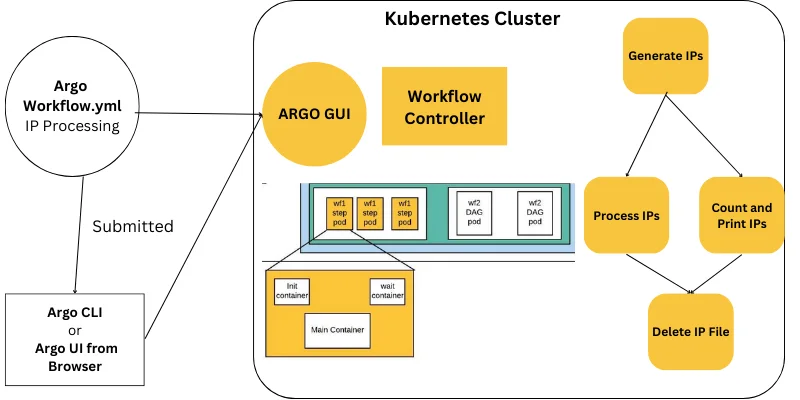
This Argo Workflows tutorial takes you from a single "hello world" container to a realistic multi-step pipeline with parameters, outputs, loops, conditions, retries and an exit handler. Each section adds one concept, shows working YAML and explains exactly what the workflow controller does with it. You can follow along on any Kubernetes cluster where Argo Workflows is installed.
If you have not installed Argo Workflows yet, complete the installation guide first. The commands below assume the controller runs in the argo namespace and that the argo CLI is on your path.
Prerequisites
Before starting, confirm the following:
- A running Kubernetes cluster (kind, k3d, minikube or a cloud cluster).
kubectlconfigured to talk to that cluster.- Argo Workflows installed in the
argonamespace. - The
argoCLI installed (argo versionprints client and server versions). - A service account that workflows can use. For learning, the quick start setup is fine; for shared clusters, follow the RBAC section of the Kubernetes integration guide.
Check that the controller is healthy:
kubectl -n argo get pods
argo version
Step 1: Run a Single-Container Workflow
Create a file called hello.yaml:
apiVersion: argoproj.io/v1alpha1
kind: Workflow
metadata:
  generateName: hello-
spec:
  entrypoint: say-hello
  templates:
    - name: say-hello
      container:
        image: busybox:1.36
        command: [sh, -c]
        args: ["echo 'Hello, Argo Workflows!'"]
Submit it and watch progress:
argo submit -n argo hello.yaml --watch
What Just Happened
- The CLI sent the
Workflowobject to the Kubernetes API. - The controller saw the new object and resolved the
entrypointto thesay-hellotemplate. - It created one pod running
busybox, with Argo's init and wait containers alongside. - When the main container exited with code 0, the node and the workflow were marked
Succeeded.
Read the logs with argo logs -n argo @latest. The @latest shortcut refers to the most recently created workflow, which saves copying generated names.
Step 2: Add Input Parameters
Hard-coded values are rarely useful. Parameters make templates reusable:
apiVersion: argoproj.io/v1alpha1
kind: Workflow
metadata:
  generateName: greet-
spec:
  entrypoint: greet
  arguments:
    parameters:
      - name: who
        value: "platform team"
  templates:
    - name: greet
      inputs:
        parameters:
          - name: who
      container:
        image: busybox:1.36
        command: [sh, -c]
        args: ["echo Hello, {{inputs.parameters.who}}"]
Override the value at submit time without editing the file:
argo submit -n argo greet.yaml -p who="data engineers" --watch
Key Points About Parameters
spec.arguments.parametersdefines workflow-level values that callers can override.- When the entrypoint template declares an input with the same name, the workflow argument is passed to it automatically.
- Expressions use double curly braces. If a reference cannot be resolved, validation fails before any pod runs, which protects you from typos.
Step 3: Chain Steps Together
A steps template calls other templates. Each outer list item is a stage that runs after the previous stage completes; items inside a stage run in parallel.
apiVersion: argoproj.io/v1alpha1
kind: Workflow
metadata:
  generateName: pipeline-
spec:
  entrypoint: main
  templates:
    - name: main
      steps:
        - - name: fetch
            template: echo
            arguments:
              parameters: [{name: msg, value: "fetching data"}]
        - - name: clean
            template: echo
            arguments:
              parameters: [{name: msg, value: "cleaning data"}]
          - name: validate
            template: echo
            arguments:
              parameters: [{name: msg, value: "validating schema"}]
        - - name: publish
            template: echo
            arguments:
              parameters: [{name: msg, value: "publishing results"}]
    - name: echo
      inputs:
        parameters:
          - name: msg
      container:
        image: busybox:1.36
        command: [echo, "{{inputs.parameters.msg}}"]
Here fetch runs first, clean and validate run at the same time, and publish waits for both. The echo template is defined once and reused four times.
Step 4: Pass Outputs Between Steps
Real pipelines need data to flow. Output parameters read a value from a file in the container after it finishes:
    - name: get-version
      container:
        image: busybox:1.36
        command: [sh, -c]
        args: ["echo -n 1.4.2 > /tmp/version.txt"]
      outputs:
        parameters:
          - name: version
            valueFrom:
              path: /tmp/version.txt
A later step consumes it with {{steps.get-version.outputs.parameters.version}}. For script templates, standard output is captured automatically as outputs.result:
    - name: pick-number
      script:
        image: python:3.12-alpine
        command: [python]
        source: |
          import random
          print(random.randint(1, 10))
Reference it with {{steps.pick.outputs.result}}. Keep results small; stdout is stored in the workflow status, and large values bloat the object.
Step 5: Add Conditions With when
Conditions decide whether a step runs. They are evaluated after the referenced outputs exist:
    - name: main
      steps:
        - - name: pick
            template: pick-number
        - - name: big
            template: echo
            when: "{{steps.pick.outputs.result}} > 5"
            arguments:
              parameters: [{name: msg, value: "big number"}]
          - name: small
            template: echo
            when: "{{steps.pick.outputs.result}} <= 5"
            arguments:
              parameters: [{name: msg, value: "small number"}]
Steps whose condition evaluates to false appear as Skipped in the UI. When comparing strings, wrap both sides in single quotes, for example "'{{inputs.parameters.env}}' == 'prod'".
Step 6: Fan Out With Loops
Loops create one node per item, all running in parallel unless limited by parallelism.
Static Lists With withItems
        - - name: process
            template: echo
            arguments:
              parameters: [{name: msg, value: "region {{item}}"}]
            withItems: [us-east, eu-west, ap-south]
Dynamic Lists With withParam
withParam takes a JSON array produced by an earlier step, which enables data-driven fan-out:
    - name: list-files
      script:
        image: python:3.12-alpine
        command: [python]
        source: |
          import json
          print(json.dumps(["a.csv", "b.csv", "c.csv"]))
Then loop with withParam: "{{steps.list.outputs.result}}". Add parallelism: 2 to the template or workflow spec to cap how many pods run at once.
Step 7: Make Steps Resilient With Retries
Transient failures — network blips, rate limits, spot instance interruptions — should not fail an entire pipeline:
    - name: call-api
      retryStrategy:
        limit: "3"
        retryPolicy: OnFailure
        backoff:
          duration: "10s"
          factor: "2"
          maxDuration: "5m"
      container:
        image: curlimages/curl:8.10.1
        command: [curl, -fsS, "https://example.com/health"]
OnFailure retries when the main container exits non-zero. OnError retries on Argo-level errors such as pod deletion, OnTransientError retries errors that match known transient patterns, and Always retries on both failures and errors. Combine retries with activeDeadlineSeconds so a stuck step cannot run forever.
Step 8: Always Run Cleanup With an Exit Handler
An exit handler runs once the main workflow finishes, regardless of the result. The {{workflow.status}} variable tells it how things went:
spec:
  entrypoint: main
  onExit: notify
  templates:
    - name: notify
      container:
        image: busybox:1.36
        command: [sh, -c]
        args: ["echo Workflow {{workflow.name}} finished with status {{workflow.status}}"]
Swap the echo for a Slack webhook call, a ticket update or a cleanup command. Exit handlers are the standard place for notifications.
Step 9: Keep the Cluster Tidy
Completed pods and workflow objects accumulate quickly. Add these fields to every production workflow:
spec:
  ttlStrategy:
    secondsAfterCompletion: 86400
  podGC:
    strategy: OnPodSuccess
  activeDeadlineSeconds: 3600
ttlStrategydeletes the workflow object a day after it completes.podGCremoves successful pods immediately while keeping failed pods for debugging.activeDeadlineSecondsfails the whole workflow if it runs longer than an hour.
Step 10: Turn the Pipeline Into a Reusable Template
Once a workflow works, you rarely want to keep a copy on your laptop. Change kind: Workflow to kind: WorkflowTemplate, replace generateName with a fixed name, and apply it with kubectl apply -n argo -f pipeline.yaml. Anyone with permission can now start a run with argo submit -n argo --from workflowtemplate/pipeline -p who=ops, and other workflows can call individual templates from it with templateRef. Storing templates in Git and syncing them with Argo CD gives you code review, history and rollbacks for pipelines, which is the pattern most mature teams settle on. The WorkflowTemplate guide explains naming, versioning and cluster-scoped templates in depth.
Understanding Workflow and Node Phases
Every workflow and every node inside it moves through a small set of phases. Knowing them makes the UI and the argo get output much easier to read:
- Pending: the node exists but its pod has not started, usually because of scheduling, image pulls or init containers.
- Running: the pod's main container is executing, or child nodes of a steps or DAG template are still in progress.
- Succeeded: the main container exited with code 0 and outputs were saved.
- Failed: the main container exited non-zero, a condition failed, or a deadline was exceeded.
- Error: something went wrong outside your code, such as a pod being deleted, an artifact upload failing or an invalid expression.
- Skipped: a
whencondition evaluated to false. - Omitted: in DAGs, a task that was not run because its
dependsexpression could never be satisfied.
The distinction between Failed and Error matters for retries. OnFailure retries only failures from your container, while OnError covers infrastructure problems. When in doubt, Always covers both, at the cost of retrying genuine bugs.
Best Practices for Writing Workflows
Habits formed while learning carry straight into production, so it is worth adopting good ones early:
- Pin image tags.
busybox:1.36is reproducible;busybox:latestcan change under you and break a pipeline overnight. - Set resource requests on every container. Without requests the scheduler cannot pack pods efficiently, and without limits one step can starve its neighbours.
- Name steps after what they do.
validate-schemareads better in the UI and in expressions thanstep2. - Keep templates small and focused. One template should do one job, which makes reuse and testing straightforward.
- Lint before you submit. Run
argo lintlocally or in CI so mistakes are caught before they reach the cluster. - Add deadlines, retries and cleanup from day one. Retrofitting them after an incident is always harder.
Essential CLI Commands
| Command | Purpose |
|---|---|
argo submit file.yaml --watch |
Submit and stream progress |
argo list -n argo |
List workflows and phases |
argo get @latest |
Show the node tree and messages |
argo logs @latest --follow |
Stream logs from all pods |
argo retry <name> |
Retry failed nodes of a workflow |
argo resubmit <name> |
Submit a fresh copy |
argo stop / argo terminate |
Stop gracefully or immediately |
argo lint file.yaml |
Validate before submitting |
Putting It All Together
By now you have used every major building block. A realistic pipeline simply combines them: workflow arguments for the inputs that change between runs, a steps or DAG template for ordering, script templates for small pieces of logic, container templates for the heavy work, output parameters and artifacts to move data forward, conditions and loops to adapt to that data, retries and deadlines for resilience, an exit handler for notifications, and cleanup settings for the cluster. Writing a pipeline becomes a matter of choosing which blocks you need rather than inventing new mechanisms each time.
Troubleshooting This Tutorial
Unable to resolve: {{steps.x.outputs.result}}— the step name in the expression does not match the stepname, or the referenced template is not a script. Useoutputs.parametersfor container templates.- Condition never true — numeric comparisons fail if the output contains a trailing newline. Use
echo -nor strip whitespace in scripts. - Loop runs once with the whole JSON string —
withParamneeds a valid JSON array, not a newline-separated list. - Exit handler not running — confirm
onExitnames an existing template and that the workflow was not deleted before completion. - Pod stuck in
PodInitializing— inspect the init container logs; artifact downloads or image pulls are the usual cause.
Paste any failing manifest into the YAML validator for an instant structural check.
Frequently Asked Questions
Should I use steps or a DAG?
Use steps for mostly linear pipelines with a few parallel stages. Use a DAG when dependencies are irregular or when you want independent branches to start as early as possible.
Can I test workflows locally?
Yes. Run a kind or k3d cluster on your laptop, install Argo Workflows, and submit workflows exactly as you would in production.
How do I see the graph?
Port-forward the Argo Server with kubectl -n argo port-forward svc/argo-server 2746:2746 and open https://localhost:2746. You can also paste YAML into our DAG visualizer.
What is the difference between retry and resubmit?
argo retry re-runs only the failed nodes of an existing workflow and keeps successful results. argo resubmit creates a brand-new workflow from the same spec and runs everything again, optionally using memoized results.
Can I write workflows in Python instead of YAML?
Yes. Hera, a community Python SDK, generates Argo Workflows manifests from Python code. The resulting YAML is identical to hand-written manifests, so everything in this tutorial still applies.
How large can an output parameter be?
Keep parameters small — ideally under a few kilobytes. Use artifacts for files and large data.
Key Takeaways
- Parameters make templates reusable; outputs move data forward.
- Retries, deadlines and cleanup belong in every production workflow.
- Lint manifests before submitting them so mistakes never reach the cluster.
- Convert stable pipelines into WorkflowTemplates so they can be shared, scheduled and reviewed in Git.
Next Steps
You now know the building blocks used in almost every real pipeline. Continue with the Argo Workflows YAML reference to learn every important field, browse ready-made examples, or turn this tutorial into a reusable WorkflowTemplate.

Written and reviewed according to our editorial policy. Spotted an error? Tell us and we will fix it. This site is independent and not affiliated with the Argo Project.
Related guides
 Introduction
What Is Argo Workflows and How Does It Work?
Learn what Argo Workflows is, how its Kubernetes-native architecture works, the core concepts behind templates, steps and DAGs, and when it is the right engine for your pipelines.
 Workflow Automation
How Is an Argo Workflows YAML File Structured?
Understand every important field in Argo Workflows YAML — metadata, spec, templates, inputs, outputs, variables, expressions, retries, deadlines, garbage collection and synchronisation.
 Workflow Automation
Which Argo Workflows Examples Should You Learn First?
Twelve practical Argo Workflows examples with working YAML — parameters, scripts, artifacts, loops, conditionals, retries, exit handlers, resource templates, suspend gates and more.