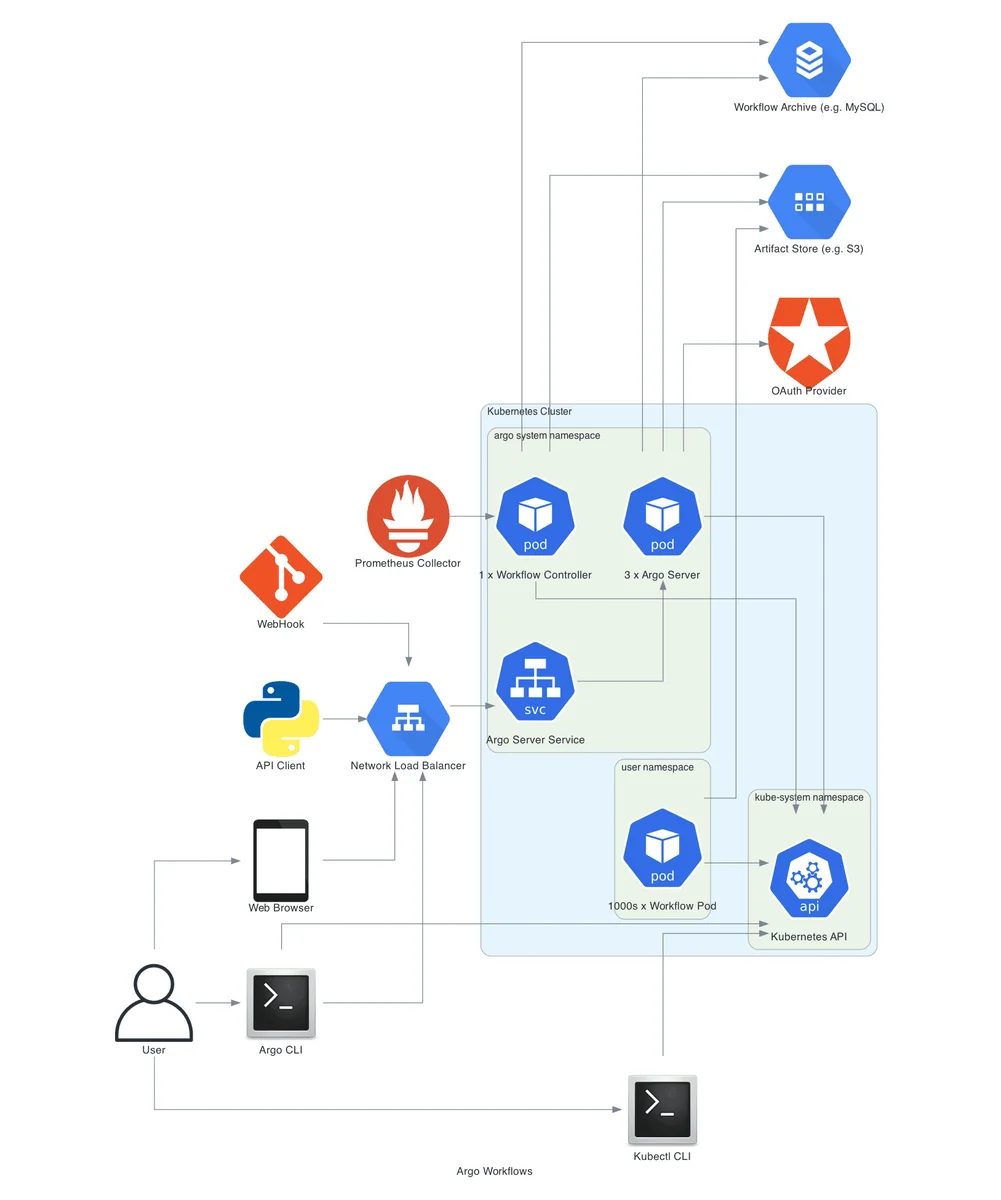
Argo Workflows is not a system that happens to run on Kubernetes — it is built from Kubernetes primitives. Every step is a pod, every workflow is a custom resource, and every permission is an RBAC rule. That tight integration is a major strength, but it also means that most production problems are really Kubernetes problems: a missing role, a pod that cannot be scheduled, a secret mounted in the wrong place. This guide explains how the pieces fit together and how to configure them correctly.
How Argo Workflows Uses Kubernetes Objects
| Kubernetes object | Role in Argo Workflows |
|---|---|
| CustomResourceDefinition | Defines Workflow, WorkflowTemplate, CronWorkflow and related kinds |
| Deployment | Runs the workflow controller and Argo Server |
| Pod | Executes each container, script or resource step |
| ServiceAccount | Identity used by workflow pods and by the controller |
| Role / ClusterRole | Permissions for the controller, server, executor and users |
| ConfigMap | Controller configuration, semaphores and artifact repositories |
| Secret | Credentials for artifact stores, registries and applications |
| PersistentVolumeClaim | Shared volumes between steps via volumeClaimTemplates |
When something fails, ask which of these objects is involved. The answer usually points directly to the fix.
Service Accounts: The Most Important Setting
Who Uses Which Identity
Three different identities are involved in a typical installation:
- The controller's service account creates and deletes pods, reads ConfigMaps and updates workflow status. It is created by the installation manifest.
- The Argo Server's service account serves the UI and API. In client auth mode, requests are made with the caller's token instead.
- The workflow's service account is used by every pod in a workflow. This is the one you configure with
spec.serviceAccountName.
If you do not set serviceAccountName, pods use the namespace's default service account, which normally has no permissions. Since version 3.4, the executor in each pod must be able to create and patch WorkflowTaskResult objects to report outputs, so the default account is not enough.
Minimal Executor Role
Create a dedicated service account with only the permissions the executor needs:
apiVersion: v1
kind: ServiceAccount
metadata:
  name: argo-workflow
  namespace: data-pipelines
---
apiVersion: rbac.authorization.k8s.io/v1
kind: Role
metadata:
  name: argo-executor
  namespace: data-pipelines
rules:
  - apiGroups: [argoproj.io]
    resources: [workflowtaskresults]
    verbs: [create, patch]
---
apiVersion: rbac.authorization.k8s.io/v1
kind: RoleBinding
metadata:
  name: argo-workflow-executor
  namespace: data-pipelines
roleRef:
  apiGroup: rbac.authorization.k8s.io
  kind: Role
  name: argo-executor
subjects:
  - kind: ServiceAccount
    name: argo-workflow
    namespace: data-pipelines
Then reference it in workflows:
spec:
  serviceAccountName: argo-workflow
You can generate these three manifests for any namespace with the Kubernetes YAML generator.
Extra Permissions for Resource Templates
Steps that create or patch Kubernetes objects need additional rules. A workflow that launches Jobs and waits for them needs create, get, list, watch and possibly delete on jobs in the batch group. Grant those permissions to a separate service account and set it only on the templates that need it, using the template-level serviceAccountName field. That way a compromised data-processing step cannot create arbitrary workloads.
User Permissions
Users who submit workflows need RBAC too. A developer role typically needs create, get, list, watch, update, patch and delete on workflows, plus get, list and watch on workflowtemplates and cronworkflows, and get/list on pods and pods/log to read logs. Platform administrators can bundle these into a ClusterRole and bind it per namespace.
Namespaces and Multi-Tenancy
Namespaces are the natural tenancy boundary. A common layout is:
argo— controller, server and shared ConfigMaps, owned by the platform team.team-a,team-b, … — workflows, templates, service accounts and secrets owned by each team.
The controller can watch all namespaces or a list of them. Each team namespace gets its own executor service account, its own artifact repository configuration if needed, and a ResourceQuota that caps CPU, memory and pod counts. Combine this with Argo Server SSO and RBAC so that users only see workflows in namespaces they belong to.
Resource Quotas and Limit Ranges
apiVersion: v1
kind: ResourceQuota
metadata:
  name: workflow-quota
  namespace: team-a
spec:
  hard:
    requests.cpu: "40"
    requests.memory: 80Gi
    pods: "200"
A LimitRange can add default requests and limits to containers that do not declare them, which protects the quota from unbounded pods. Remember that Argo's init and wait containers also count against quotas; you can set their resources in the controller ConfigMap under executor.resources.
Resource Requests, Limits and Scheduling
Requests and Limits
Every main container should declare requests so the scheduler can place it correctly, and memory limits so a leak cannot take down a node:
container:
  image: ghcr.io/example/etl:1.8.0
  resources:
    requests:
      cpu: "1"
      memory: 2Gi
    limits:
      memory: 4Gi
Many teams omit CPU limits to avoid throttling while still setting memory limits, because exceeding memory leads to an OOMKilled termination that is easy to diagnose.
Node Selection
Route specialised steps to specialised hardware with nodeSelector, tolerations and affinity, either per template or as workflow defaults:
- name: train
  nodeSelector:
    node.kubernetes.io/instance-type: g5.xlarge
  tolerations:
    - key: nvidia.com/gpu
      operator: Exists
      effect: NoSchedule
  container:
    image: ghcr.io/example/trainer:3.0.0
    resources:
      limits:
        nvidia.com/gpu: 1
Autoscaling Behaviour
Pending workflow pods trigger the cluster autoscaler or Karpenter just like any other pod. Large fan-outs can create many nodes quickly, so use parallelism and quotas to keep scaling predictable, and consider pod priority classes so critical workflows are scheduled first.
Volumes and Shared Storage
Artifacts are the preferred way to pass files, but some workloads need a shared file system. volumeClaimTemplates creates a PVC for the lifetime of the workflow:
spec:
  volumeClaimTemplates:
    - metadata:
        name: workdir
      spec:
        accessModes: [ReadWriteOnce]
        resources:
          requests:
            storage: 5Gi
Mount it in templates with volumeMounts. Note that ReadWriteOnce volumes can only be attached to one node, so parallel steps on different nodes will fail to start; use ReadWriteMany storage or artifacts for parallel access. Set volumeClaimGC to delete the PVC when the workflow completes.
Secrets and Configuration
Never pass secrets as parameters: parameter values are stored in the workflow status and displayed in the UI. Instead, reference Kubernetes Secrets:
container:
  image: ghcr.io/example/loader:1.2.0
  env:
    - name: DB_PASSWORD
      valueFrom:
        secretKeyRef:
          name: warehouse-credentials
          key: password
For organisations using Vault, AWS Secrets Manager or Google Secret Manager, the External Secrets Operator can sync values into Kubernetes Secrets that workflows consume in exactly the same way. Cloud workload identity (IRSA, Workload Identity, Entra Workload ID) is even better because it removes long-lived credentials entirely.
Workload Identity Example on EKS
On Amazon EKS, IAM Roles for Service Accounts link a Kubernetes service account to an IAM role. Annotate the workflow service account and every pod that uses it receives temporary AWS credentials automatically:
apiVersion: v1
kind: ServiceAccount
metadata:
  name: argo-workflow
  namespace: data-pipelines
  annotations:
    eks.amazonaws.com/role-arn: arn:aws:iam::123456789012:role/argo-data-pipelines
Scope the IAM policy to the specific buckets and prefixes the namespace needs. The same idea applies on GKE with the iam.gke.io/gcp-service-account annotation and on AKS with the azure.workload.identity/client-id annotation plus the matching pod label. With identity handled this way, artifact repositories can set useSDKCreds: true and no access keys ever appear in the cluster.
Configuring the Executor Containers
Every workflow pod includes Argo's own init and wait containers alongside your main container. Their resources and image are configured once in the controller ConfigMap rather than in each workflow:
data:
  executor: |
    resources:
      requests: {cpu: 10m, memory: 64Mi}
      limits: {memory: 256Mi}
    securityContext:
      runAsNonRoot: true
      runAsUser: 8737
Setting these values matters on clusters that enforce requests on every container, such as GKE Autopilot, and in namespaces with tight quotas where the executor's default footprint adds up across large fan-outs.
Running Workflows on Spot and Preemptible Nodes
Batch work is an excellent fit for spot capacity, which can cost a fraction of on-demand pricing. Combine three Kubernetes and Argo features to make it safe. First, steer appropriate templates to spot node pools with node selectors or affinity. Second, add a retryStrategy with retryPolicy: OnError or OnTransientError so that a pod lost to node reclamation is retried rather than failing the workflow. Third, keep critical steps — such as a final publish or a database migration — on on-demand nodes where interruption would be costly. With artifacts saved between steps, a reclaimed node only costs the work of the single step that was running.
Pod Security
Apply the same pod security standards you use for applications:
- Set
securityContext.runAsNonRoot: trueand a non-zerorunAsUserat workflow level. - Drop all Linux capabilities and disallow privilege escalation.
- Avoid
privileged: true; build images with tools such as Kaniko or Buildah rootless mode instead of Docker-in-Docker. - Use the
restrictedPod Security Admission profile on workflow namespaces where possible.
The emissary executor works with non-root containers, which makes restricted profiles practical.
Networking
Workflow pods need to reach the Kubernetes API (for task results), your artifact store and whatever systems your steps call. If you use NetworkPolicies with a default-deny stance, explicitly allow egress to the API server and the artifact endpoint, otherwise steps will hang or error while saving outputs. The Argo Server should be exposed only through an authenticated Ingress or Gateway, never directly as a public LoadBalancer.
Cost Visibility
Because every step is a pod, Kubernetes cost tools can attribute spend to workflows with surprising precision. Add consistent labels — team, pipeline, environment — to spec.podMetadata.labels so they appear on every pod, then group by those labels in your cost tool. You can answer questions such as "how much did last month's model training cost?" or "which pipeline uses the most GPU hours?" without any custom instrumentation. Pair this with right-sizing based on observed usage, and many teams find substantial savings simply by lowering inflated memory requests.
Observability on Kubernetes
- Metrics: the controller exposes Prometheus metrics for workflow counts, durations and errors. Custom metrics can be emitted per template.
- Logs: pods' logs disappear when pods are garbage collected, so ship them to a log store or configure
archiveLogsto save logs as artifacts. - Events:
kubectl get events -n <ns> --sort-by=.lastTimestampreveals scheduling, image pull and quota failures quickly.
Troubleshooting Kubernetes Integration
workflowtaskresults.argoproj.io is forbidden— the workflow service account lacks the executor role shown above.pods is forbidden ... exceeded quota— the namespace ResourceQuota is full; reduce parallelism or raise the quota.- Pods stuck in Pending — insufficient resources, unsatisfiable node selectors or missing tolerations. Check
kubectl describe pod. OOMKilled/ exit code 137 — the container exceeded its memory limit; raise the limit or reduce memory usage.- Volume multi-attach errors — a
ReadWriteOncePVC is mounted by pods on different nodes. - Timeouts saving outputs — a NetworkPolicy blocks egress to the API server or artifact store.
Frequently Asked Questions
Does every step need its own pod?
Container, script and resource steps each create a pod. Steps and DAG templates do not, and containerSet runs several containers in one pod.
Can workflows run in a different namespace from the controller?
Yes. This is the recommended layout for multi-team clusters.
Do workflow pods need access to the Kubernetes API?
Yes, at minimum to create and patch WorkflowTaskResult objects so the controller learns about outputs. If your network policies block the API server, steps will complete but outputs will never be recorded.
Can I run Windows containers in workflows?
Yes. Argo supports Windows nodes; schedule Windows steps with a kubernetes.io/os: windows node selector and use Windows-compatible images. Mixed workflows can run Linux and Windows steps side by side.
How do I stop one team from consuming the whole cluster?
Combine namespace ResourceQuotas, LimitRanges, workflow parallelism and semaphores. Priority classes ensure critical workflows are scheduled first when capacity is tight.
Should I use the default service account?
No. Create a dedicated account with the minimal executor role, and grant extra permissions only to the templates that need them.
How do I give a step cloud permissions?
Use your cloud's workload identity feature and annotate the service account, rather than mounting static keys.
Key Takeaways
- Every workflow needs a dedicated service account with the executor role.
- Grant extra permissions per template, not per workflow.
- Requests, limits and quotas keep shared clusters stable.
- Keep secrets in Kubernetes Secrets or workload identity, never in workflow parameters, and enforce restricted pod security on workflow namespaces.
Conclusion
Correct Kubernetes configuration is what turns Argo Workflows from a demo into a dependable platform. Start with dedicated service accounts and least-privilege RBAC, add quotas and resource requests, keep secrets out of parameters, and enforce pod security. Generate the RBAC boilerplate with our Kubernetes YAML generator and check finished manifests with the Configuration Checker. Treat these settings as the foundation on which every other workflow feature depends.

Written and reviewed according to our editorial policy. Spotted an error? Tell us and we will fix it. This site is independent and not affiliated with the Argo Project.
Related guides
 Installation
How Do You Install Argo Workflows on Kubernetes?
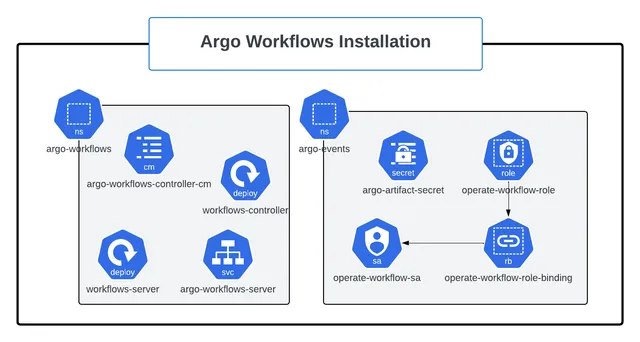
Install Argo Workflows on Kubernetes with kubectl manifests or Helm, install the argo CLI, access the UI, configure an artifact repository and harden the setup for production.
 Troubleshooting & Errors
How Do You Fix Common Argo Workflows Errors?
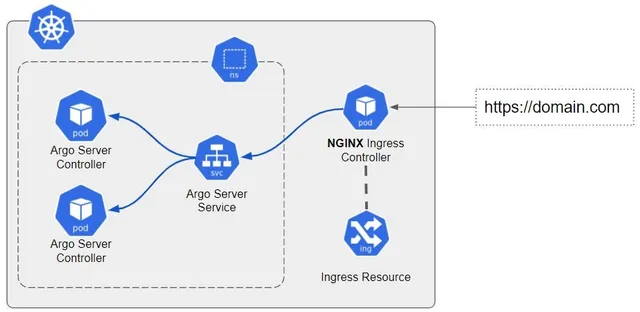
Diagnose and fix common Argo Workflows errors — RBAC and service accounts, pending pods, OOMKilled, image pulls, artifacts, parameter resolution, DAG cycles, UI login, CronWorkflows and controller issues.
 Introduction
What Is Argo Workflows and How Does It Work?
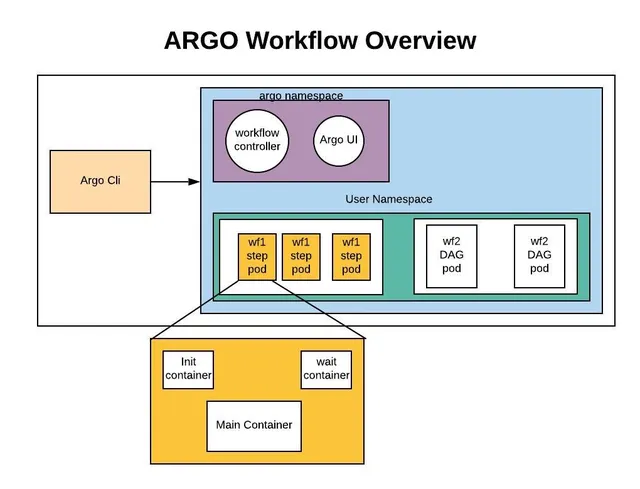
Learn what Argo Workflows is, how its Kubernetes-native architecture works, the core concepts behind templates, steps and DAGs, and when it is the right engine for your pipelines.